
Holiday Website Checklist for Siouxland Small Businesses
The holiday website checklist for a small business is shorter than you'd think. Post your holiday hours on your site and on Google. Make gift cards easy to buy. Put your specials, menus and order cutoffs where people can see them. Plan for Small Business Saturday, which falls on November 28, 2026. Have a way to tell people fast when a storm shuts you down. Then clean it all up after New Year's so January visitors don't see Christmas hours.
That's the whole idea. The rest of this post is the detail: what to change, when to change it, and a full checklist you can work through in an afternoon this week.
Early November is the right time to do this. Once Thanksgiving week hits, you'll be too busy running the business to update the website for it.
Holiday hours: the one thing you can't skip
Wrong hours are the fastest way to lose a holiday customer. Someone drives across town from the Southern Hills Mall area to pick up a gift, finds your door locked, and doesn't come back. They also might leave a review about it.
Post them on your website
Put your holiday hours somewhere obvious, not buried on the contact page. A short banner across the top of every page works well: "Holiday hours: closed Thanksgiving, open 8 to 2 on Christmas Eve, closed Christmas Day. Full hours here." Link it to a simple list.
For 2026, the big dates are:
- Thanksgiving: Thursday, November 26
- Black Friday: Friday, November 27
- Small Business Saturday: Saturday, November 28
- Christmas Eve: Thursday, December 24
- Christmas Day: Friday, December 25
- New Year's Eve: Thursday, December 31
- New Year's Day: Friday, January 1, 2027
Even if your hours don't change, say so. "Open regular hours all December" answers the question before anyone has to call.
Set special hours on Google
This matters as much as your site. For many local businesses, more people see their hours on Google than on the website. In your Google Business Profile, use the special hours setting to add each holiday date. If you don't, Google may tell searchers your hours "might differ," which makes people nervous enough to pick somewhere else. Our Google Business Profile guide shows where the setting lives.
Then check Facebook, Instagram, Yelp and anywhere else your hours show up. They should all match your site.
Quick tip: Set a phone reminder for the Monday of Thanksgiving week and again for December 21. On each one, open Google on your phone, search your business, and make sure the hours shown are right for that week.
Gift cards and year-end promos
Gift cards are the easy holiday win. They're the default gift when someone doesn't know what to buy, and they bring new customers in during January when things are slow.
Make gift cards easy to find and buy online
If you sell gift cards, put a "Gift Cards" link in your main menu from early November through the end of December. If your point-of-sale system offers e-gift cards, link straight to that page so people can buy one at 11 p.m. on December 23 and print it or email it. Many popular POS systems include this, so check yours before paying for something extra.
If you only sell physical cards in store, say so clearly, and list your hours right next to it.
Keep promos simple and honest
Year-end promos work best when they're easy to understand:
- "Buy a $50 gift card, get a $10 bonus card for yourself"
- "Book a January appointment by December 31 and save 15 percent"
- "Free gift wrap through Christmas Eve"
Put each one on its own spot on the homepage, with an end date. When it ends, take it down. A promo that expired two weeks ago looks careless.
Specials, menus and order cutoffs
The holidays bring the most "can I still...?" questions of the year. Can I still order a pie for Thanksgiving? Can I still get this shipped by Christmas? Answer them on the site before people have to ask.
Holiday menus and specials
Restaurants, bakeries, coffee shops and caterers should post holiday menus as real text on a web page, not just a photo of a flyer. Text loads faster on phones, can be read by Google, and is easier for anyone using a screen reader. Include prices, how to order, and the last day to order. Our restaurant website guide covers menus in more detail.
If you take holiday party bookings or catering orders, put that on the homepage too, with a simple form or a phone number. Office parties get booked early.
Shipping and pickup cutoffs
If you ship anything, post your own "order by" dates. USPS, UPS and FedEx all publish holiday shipping deadlines each fall. Check theirs, then set yours a few days earlier to leave room for packing and the inevitable winter delay.
For local pickup and delivery, post the last day for orders and your pickup hours on Christmas Eve. Say plainly what happens if someone misses the cutoff: can they still pick up in store, or is it after the holidays?
Small Business Saturday and shopping local
Small Business Saturday is the Saturday after Thanksgiving. In 2026, that's November 28. It's a good day for local shops, and plenty of people go out looking for places to support, from Historic 4th Street in Sioux City to Phillips Ave in downtown Sioux Falls.
To get the most from it on your website:
- Put a Small Business Saturday note on your homepage the week before, with your hours that day
- Mention anything special: a sale, a free coffee, a new product, a local maker you're featuring
- Post it on your Google Business Profile as an update
- Tell people where to park, especially if you're downtown
- Make sure your address and a map link are easy to find on a phone
If you're part of a local shopping event or a downtown open house, mention it and link to the organizer's page. People like seeing that you're part of something.
Questions?
Let’s talk.Talk through your website, your goals and what comes next. No pressure.
Book a free call
Winter weather closures and events
Siouxland winters don't care about your holiday schedule. A storm can close I-29, empty the streets and shut you down on a Saturday in December.
Have a weather closure plan before you need it
Decide now how you'll tell people when you close for weather. Then make it possible to do it from your phone in two minutes:
- A banner you can turn on at the top of your site that says "Closed today due to weather. We'll reopen (day)."
- Special hours on Google for that day
- A post on Facebook or Instagram
If only one person in your business knows how to update the website, and they're snowed in, nothing gets posted. Write the steps down somewhere the whole team can find them.
List your holiday events
Hosting a holiday open house, a cookie decorating night, a gift-wrapping day or extended shopping hours? Give each event its own short section with the date, time, address and whether people need to sign up. Add them to your Google Business Profile too. Take each one down the day after it happens.
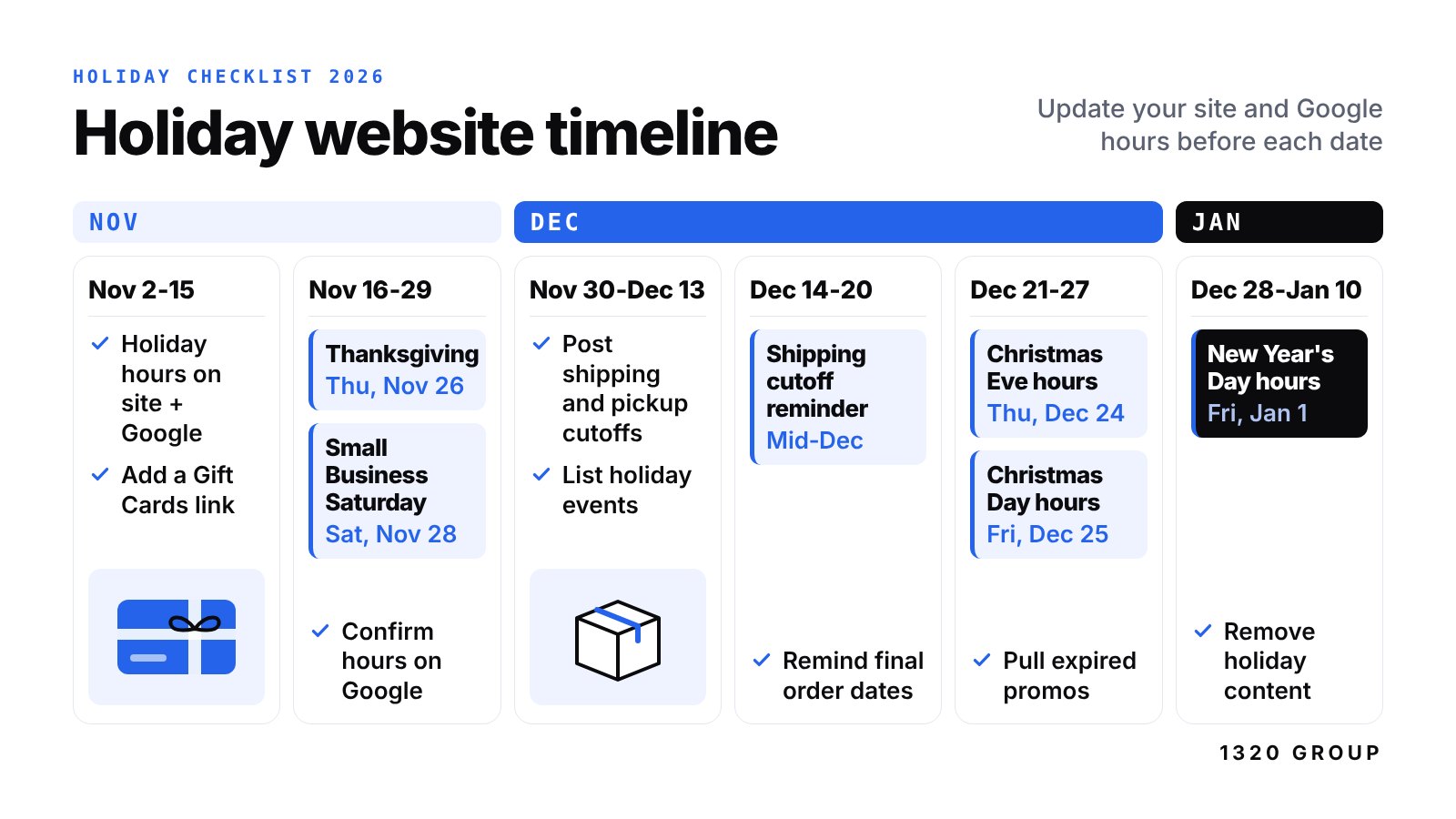
Holiday website timeline
Here's when to do what. Tape it next to the register if you need to.
| When | What to do on your website |
|---|---|
| Early November | Add holiday hours to site and Google, add a Gift Cards menu link, post holiday menus and order cutoffs, set up a weather closure banner |
| Week before Thanksgiving | Add Small Business Saturday details, check every hour listing matches, test your order and contact forms |
| Thanksgiving week | Confirm Thanksgiving, Black Friday and Saturday hours on Google, post any Black Friday or Saturday specials |
| Early December | Post shipping and pickup cutoffs, list holiday events, push gift cards |
| Mid December | Remind people of final order dates, recheck Christmas Eve and Christmas hours |
| Week of Christmas | Pull expired promos, post New Year's hours |
| After New Year | Remove holiday banners, menus and hours, update the copyright year, ask holiday customers for reviews |
The full holiday website checklist
Work through this list once in early November, then check it again Thanksgiving week.
Your checklist
- Holiday hours posted on your website, easy to find on a phone
- Special hours added on your Google Business Profile for every holiday date
- Hours match on Facebook, Instagram, Yelp and anywhere else they appear
- "Gift Cards" link in your main menu
- Online gift card purchase tested start to finish
- Holiday menu or specials posted as real text, with prices
- Last day to order for Thanksgiving and Christmas posted clearly
- Shipping "order by" dates posted, a few days before carrier deadlines
- Christmas Eve pickup hours posted
- Small Business Saturday note on the homepage with your hours on November 28
- Parking and address info easy to find
- Year-end promos posted with clear end dates
- Holiday events listed with date, time and sign-up info
- Weather closure banner ready to turn on from a phone
- At least two people know how to post a closure
- Contact form and phone number tested on a phone
- Reminder set to remove holiday content after New Year's
After the holidays: clean it up
In the first week of January, take everything holiday off the site. Old Christmas hours sitting there in February tell people nobody is watching. Swap the banners, remove the menus, restore normal hours on Google, update the footer copyright year to 2027, and thank your holiday customers with a review request. Our post on getting more Google reviews has an easy script.
January is also the best time to plan the year ahead. Our 2027 website plan checklist picks up right where this one ends.
Should you rebuild your site before the holidays?
Honestly, probably not, if you're starting in November. If your site is hard to update, slow or out of date, do the quick fixes now so you get through December, then plan a proper rebuild for January when things calm down. A new site launched in the middle of your busiest weeks is stress you don't need.
When you are ready, our $1,320 flat website includes up to 5 pages, a mobile-first design, modern SEO, a contact form, domain connection and 2 rounds of revisions. Add Hosting & Care for $32 a month or $320 a year and holiday banners, hours changes and promo swaps can come out of the 1 hour of updates included each month.
Cover photo: Christmas Lights in Los Altos, California 5 by peptic_ulcer, licensed CC BY-SA 2.0. Cover image adapted from it and shared under the same license.
FAQ
When should I put holiday hours on my website?
Early November is ideal. Many people plan Thanksgiving and holiday shopping weeks ahead, and getting your hours up before Thanksgiving week means you won't be scrambling. Add them to Google at the same time.
When is Small Business Saturday in 2026?
Small Business Saturday is the Saturday after Thanksgiving. In 2026, that's November 28. Post your hours and any specials for that day on your site and Google Business Profile the week before.
Do I need to sell gift cards online?
You don't have to, but it helps. A lot of gift card sales happen at the last minute, often late at night, and an online option catches those. If your point-of-sale system already includes e-gift cards, turning them on and linking from your site is usually quick.
How do I tell customers we're closed for snow?
Use three places at once: a banner on your website, special hours on Google for that day, and a social media post. Set up the website banner ahead of time so turning it on takes a couple of minutes from your phone.
What should I take off my website after the holidays?
Holiday hours, banners, menus, expired promos and past events. Update your copyright year to 2027 and restore your normal hours on Google too. Leaving old holiday content up makes your business look unattended.
A $1,320 website. Done for you.
Up to 5 pages, mobile-first
Modern SEO and launch
One flat project fee
Get a $1,320 website