
How to Get More Google Reviews (Without Being Pushy)

The way to get more Google reviews is simple: ask more customers, at the right moment, with a link that opens the review box in one tap. Most happy customers are glad to leave one. They just don't think of it on their own, and they won't go hunting for your listing to do it.
You don't need a fancy system or a paid tool. You need a short review link, a couple of messages that sound like you, and the habit of sending them. Reply to every review you get, good and bad, and put the best ones on your website.
Here's how to do each part, plus the things you should never do because they can get reviews removed or your profile flagged.
Ask at the right moment
Timing matters more than wording. Ask when the customer is happiest, which is usually right after the result shows up, not after the invoice does.
A few examples of good moments:
- Trades and home services: at the final walkthrough, when they're looking at the new deck or the furnace is running. Or the same evening by text.
- Salons, barbers and spas: at checkout, when they've just seen the mirror.
- Restaurants and cafes: when a regular says "that was great" on the way out. A card on the table or at the register works for everyone else.
- Auto shops: when they pick up the car and it drives right.
- Professional services: when a project wraps or a problem gets solved, not halfway through.
The best trigger of all is when a customer thanks you. "Thanks so much, this is perfect" is your cue. "That means a lot. Would you mind saying that on Google? It really helps a small business like ours." Most people say yes on the spot.
Don't wait weeks. A customer who was thrilled on Tuesday has moved on by the end of the month. Same day or next day is best.
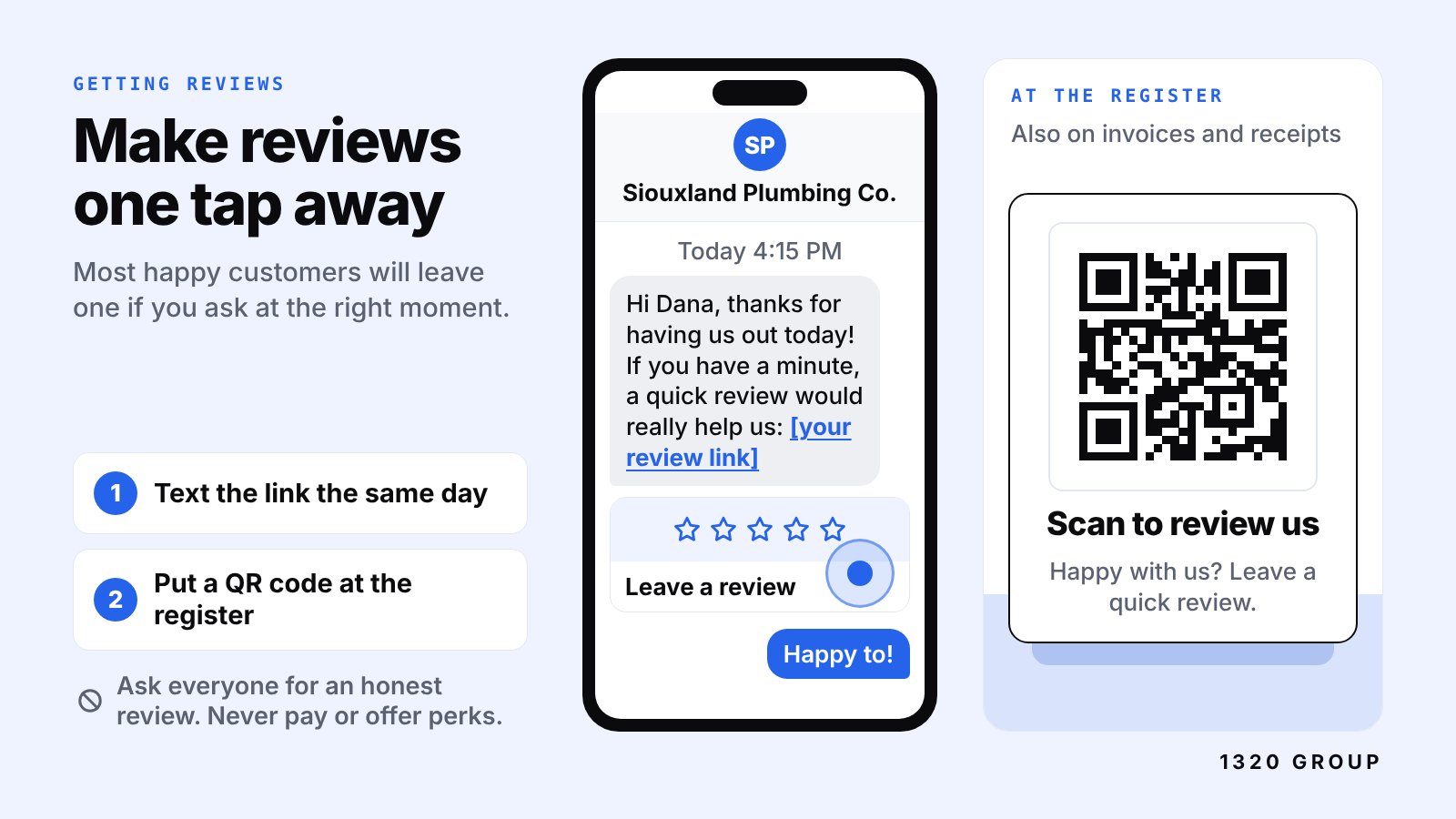
Make it one tap: your review link and QR code
Every extra step loses people. If you say "look us up on Google and leave a review," a lot of folks will mean to and never get around to it. Send a link that drops them straight into the review box.
Get your short review link
Sign in to your Google Business Profile and look for the option to ask for reviews or share a review form. Google gives you a short link that opens your review box directly. Copy it somewhere you'll find it again, like a note on your phone. If you haven't fully set up your profile yet, start with our Google Business Profile setup guide.
Test the link on your own phone before you send it to anyone. It should open the star rating and comment box, not just your listing.
Turn it into a QR code
Any free QR code generator can turn your review link into a code. Then put it where customers already are:
- A small card at the register or on each table
- The bottom of your invoices and receipts
- A sticker on the back of your business card
- A leave-behind card after a service call
- Your front door or waiting room
Keep the words next to the code short: "Happy with us? Scan to leave a quick Google review." Don't print "Leave us a 5-star review." Ask for an honest review and let the stars fall where they fall.
Text, email or in person: scripts that sound human
Which way to ask
In person works best if you're face to face. It's warm and hard to forget. But people rarely do it right then, so follow up with the link.
Text usually gets the most reviews for local service businesses. People read texts quickly, and the link is one tap away. Only text customers who gave you their number for the job, keep it to one message, and don't send it at 10 p.m.
Email works well for businesses that already email customers, like professional services or shops that send receipts by email. It's easier to ignore, so keep it short and put the link near the top.
Whatever you use, send one ask and maybe one gentle reminder a few days later. Then stop. Three reminders is how you become the pushy business you were trying not to be.
Three example messages
Change these so they sound like you. Use the customer's name and mention the actual job. That's what makes it read like a person and not a robot.
After a service call (text): Hi Dana, thanks again for having us out today. Glad the water heater is up and running. If you have a minute, a quick Google review would really help us out: [your link]. Thanks!
After a salon or shop visit (text or email): Hi Marcus, it was great seeing you today. If you're happy with how it turned out, would you leave us a quick review on Google? It helps other people find us. Here's the link: [your link]
After a bigger project (email): Hi Pat, now that the basement is finished, we just wanted to say thank you for trusting us with it. If you'd be willing to share a few words about how it went, good or bad, here's a direct link to our Google reviews: [your link]. It makes a big difference for a small crew like ours.
Notice what they have in common. A thank you, something specific about their job, one link, and no pressure. None of them ask for five stars.
Questions?
Let’s talk.Talk through your website, your goals and what comes next. No pressure.
Book a free call
Reply to every review, including the bad ones
Replying shows future customers that a real person runs this business and pays attention. Google encourages businesses to respond to reviews, and customers notice when you do.
Replying to good reviews
Keep it short and specific. Thank them by first name and mention something real. "Thanks, Jen. That patio was a fun one, glad you're enjoying it already." Avoid pasting the same "Thank you for your business!" under every review. People notice.
Replying to bad reviews
A bad review feels personal, especially in a small town where people might know you. Wait until you've cooled off, then reply calmly. Future customers aren't reading to see who wins. They're reading to see how you act when something goes wrong.
A good reply to a negative review:
- Thanks them for the feedback, even if it stings
- Owns any part that's fair, without making excuses
- Offers to fix it and gives a way to reach you directly
- Stays short, three or four sentences
- Leaves out private details about the customer or the job
If you're in healthcare or another field with privacy rules, don't even confirm the person was a client. Keep the reply general and invite them to call.
If a review is fake, from someone who was never a customer, or breaks Google's rules, you can flag it for removal from your Business Profile. Don't count on that working fast. A calm public reply still helps in the meantime.
What not to do
This is the part that can actually get you in trouble. Google's review policies prohibit fake reviews and reviews that are paid for or incentivized. Breaking those rules can get reviews removed, and in some cases Google restricts or puts warnings on a business profile. Federal regulators have also cracked down on fake and bought reviews.
Keep it simple and stay away from all of this:
- Don't buy reviews. Not from a website, not from a "reputation" service, not from a guy in a Facebook group.
- Don't offer anything in exchange for a review. No discounts, free add-ons, gift cards or contest entries. Even if you only want an honest review, the incentive is what breaks the rule.
- Don't review yourself, and don't ask employees, family or friends to post reviews pretending to be customers.
- Don't only ask the happy ones in a way that filters people out. Sending unhappy customers to a private form and happy ones to Google is called review gating, and Google doesn't allow it. Ask everyone the same way.
- Don't write reviews for customers or hand them a script to post word for word.
- Don't trade reviews with other local businesses.
It's fine to ask every customer for an honest review. That's the whole point. Asking is allowed. Paying, bribing, faking and filtering are not.
Show your reviews on your website
Your Google reviews help you on Google. Your website is where people go next to double-check you. Put your best reviews where they'll do the most work:
- Home page: two or three short reviews near the top, close to your call or quote button.
- Service pages: a review that mentions that specific service. A review about a roof replacement belongs on the roofing page.
- A Reviews or Work page: more reviews, paired with project photos if you have them. We cover where that page fits in what pages a small business website needs.
- A link to your full Google reviews, so people can see they're real.
Use the customer's first name and last initial, and the month if you have it. Ask permission before you copy a review onto your site. Most people are flattered.
Be careful with review widgets that pull in a live feed. Some are slow and drag down your page on phones. A few hand-picked reviews, typed in and updated every month or two, often load faster and look cleaner.
One more easy win: put your review link in your email signature and on your website's Contact page with a line like "Already a customer? Leave us a review." It quietly brings in reviews from people who were going to do it anyway.
A simple review routine you'll actually keep
The businesses with lots of reviews aren't doing anything clever. They ask consistently. A few new reviews every month looks better to customers than a pile from three years ago and nothing since. Fresh reviews also give Google a steady signal that you're active, which is part of the local SEO basics that help you show up in the map results around downtown Sioux Falls, Sioux City, Le Mars and beyond.
Here's a routine that takes a few minutes a week:
Your checklist
- Save your short review link on your phone and computer
- Make a QR code and put it at the register, on invoices and on leave-behind cards
- Ask every customer in person when the job wraps or they say thanks
- Send one text or email with the link within a day
- Send at most one friendly reminder, then let it go
- Reply to every new review within a few days
- Flag reviews that break Google's rules, and reply calmly anyway
- Copy your best new reviews onto your website every month or two
- Never pay, discount, filter or fake
Cover photo: Positive Customer Feedback by Zuko.io Images, licensed CC BY 2.0.
FAQ
How many Google reviews does a small business need?
There's no magic number. What matters is having enough recent, real reviews that a customer can see you're active and trusted. A steady few each month beats a big batch followed by silence. Compare yourself to the other businesses showing up for your service in your town.
Can I offer a discount for leaving a Google review?
No. Google's policies don't allow incentives for reviews, even if you only want an honest one. That includes discounts, freebies and contest entries. Just ask, and make it easy.
Should I respond to negative Google reviews?
Yes. A calm, short reply that owns what's fair and offers to make it right shows future customers how you handle problems. Don't argue or share private details. Many people trust a business more when they see a bad review handled well.
Can I ask only my happy customers for reviews?
Ask everyone the same way. Filtering people so only happy customers reach Google, sometimes called review gating, goes against Google's rules. In practice, most of the customers you ask will be the happy ones anyway, because they're the ones who stuck around.
How do I get my Google review link?
Sign in to your Google Business Profile and look for the option to ask for reviews or share a review form. Google gives you a short link that opens the review box directly. Test it on your phone, then save it where you can grab it fast.
A $1,320 website. Done for you.
Up to 5 pages, mobile-first
Modern SEO and launch
One flat project fee
Get a $1,320 website